

How to remove a Like from a link on Facebook
This post has been updated. Please go to:
How to Remove a Like from a Link on Facebook – Updated
 Have you ever clicked “like” on a link on Facebook and then realized that you do not want to like it? Perhaps it is a link to a cause or statement that you actually support, but you do not want to broadcast your support on your wall. How do you remove that “Like” from the link in your Facebook account? The following is a four step tutorial to show you how to remove a “Like” from a link on Facebook:
Step 1.
Locate and click the link: “Edit My Profile” in the upper left hand corner of the page under your name.

Step 2.
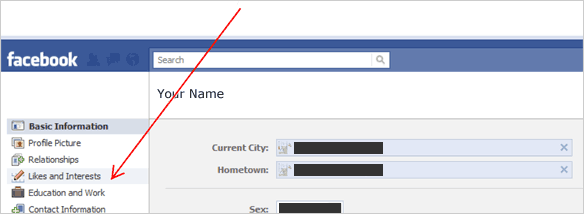
On the Profile page: Click “Likes and Interests” in the left column.
Step 3.
On the Likes and Interests page, locate the box “Activities” at the top of the center column. To the right on the Activities box, click the link: “See More”.

Step 4.
A. Highlight the link that you want to remove.
B. The title will be displayed to the right with the “Remove” link.

If you have questions about Facebook or if we may be of any assistance with your web design or social media needs, please post a comment below, contact us or call:

This info was very helpful and just what I was looking for.
C Magnus, We are glad to hear that the information helped!
Hallelujah! Thanks for the great step-by-step explanation. I visited about 10 other sites and this was the only one that worked (and used a different process than the others). Thank you!
great………..
Does not seem to work this way on the iPad, either in the Facebook app or going into Facebook through the web. Can it be done on the iPad?
Hi Bruce,
Thank you for stopping by. Yes, we have had success removing a “Like” from a link on Facebook using an iPad 2.
This page looks very useful. Would you update this page to be applicable to the new (updated on March 31, 2012) Facebook format?
Mary
Hi Mary,
We have an updated article at: http://r-rwebdesign.com/blog/?p=1754
I agree with Bruce, does not work this way with an iPad 1. Could you provide revised instructions?
Hi Chris,
Thank you for stopping by. We have put together a new tutorial for 2012 at: How to remove a Like from a link on Facebook – 2012. I have tried this on an iPad and it works fine. Please let me know if it works for you.
Thanks – I was afraid I had really messed up and nothing could be done.
You are very welcome, Patricia! We have put up a new tutorial for 2012. Please review: How to remove a Like from a link on Facebook – 2012
Hi.
I can’t seem to remove a post from my facebook page.. When I try, it says “try again later”..
This often happens, because, sometimes a person posts something, and then want the option of deleting that post, but when I try to delete, it refuses! This very frustrating..
Please tell me why this happens, and tell me why it takes SO long to eventually delete a post?
Regards
Hayley
Hi Hayley,
Unfortunately, it is difficult to determine why it is taking you so long to delete a post on Facebook. It can be a number of reasons from your connection speed or device you are using (PC, iPad, etc.) to a temporary hiccup in the Facebook interface.
I have noticed that when I click the “Edit or Remove” button next to a post, that I have to click it twice at times to show the drop down menu so that I can click delete or hide from Timeline. This process is also slow on an iPad.
I hope this has helped, Hayley. Please let us know if you have further questions.